Bun, a nova runtime JavaScript

Bun!

Have you heard of Bun?
Bun is a new JavaScript runtime developed to be a drop-in replacement for Node.js. It natively implements hundreds of Node.js and Web APIs, including fs, path, Buffer, and much more.
Bun is a toolkit for JavaScript and TypeScript that enables the creation of web applications, CLIs, and much more.
The Three Main Development Goals
1 - Speed:
Bun was developed to be fast. It was extended from JavaScriptCore, initially developed for Safari.
2 - Elegance:
Bun provides a minimal pre-configured package of highly optimized APIs for developing common tasks, such as starting an HTTP server and writing files.
3 - Cohesive DX:
Bun is a complete toolkit for JavaScript app development, including package management, test runners, and bundlers.
Bun Highlights
-
Drop-in Node.js compatibility: Bun aims for full compatibility with the Node.js API. Most npm packages intended for Node.js environments will work with Bun out of the box; the best way to know for sure is to try it.
-
Works with
node_modules: WithBun, it is still possible to usenode_modulesandpackage.jsonto manage dependencies. -
Web-standard APIs: Bun has implemented some standard APIs that are widely used, such as
fetch,ReadableStream,Request,Response,WebSocket, andFormData. -
Fast running performance: Bun inherited the
JavaScriptCoreengine, the engine created for Safari, with native speed features built in Zig. -
No more hassle: There is no need to understand how
CommonJS,ESM, file extensions, resolution priority, andpackage.jsonconfigurations work.Bunjust works. -
JSX: JSX works perfectly. Bun internally transpiles JSX syntax to vanilla JS, like TS. Bun supports React by default but respects
customJSX transform defined in tsconfig.json. -
TypeScript: TS by default, able to run
.tsand.tsxfiles without additional configuration, respectingtsconfig.json. -
Watch mode: The
bun runCLI provides a--watchflag that automatically restarts the application when a file is modified.
Benchmark
Comparison with Node.js and Deno
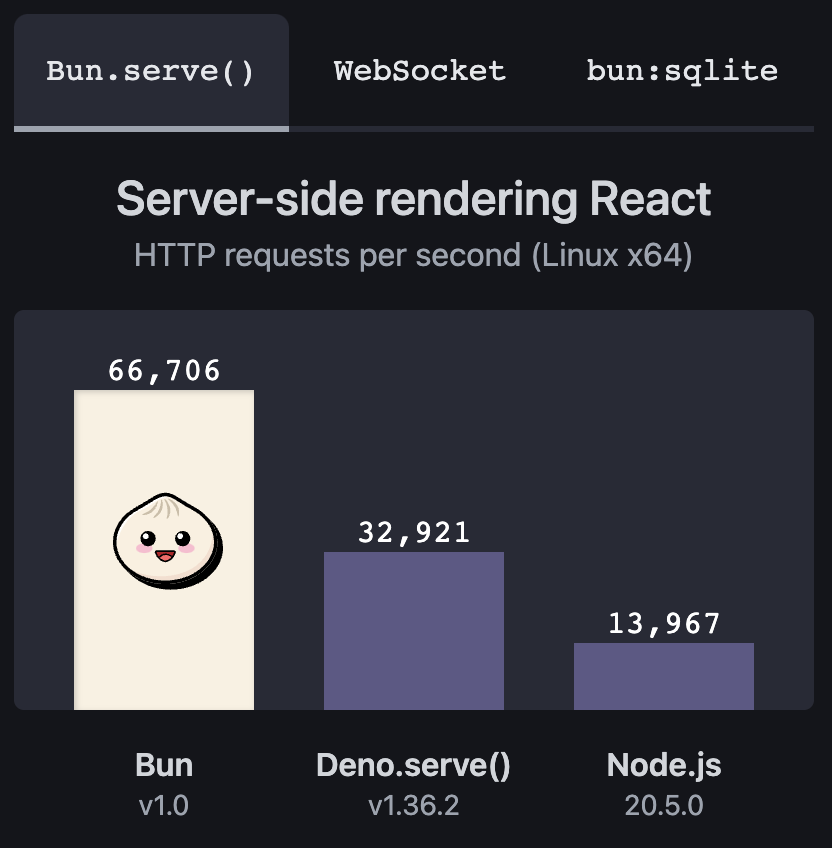
Server-side rendering
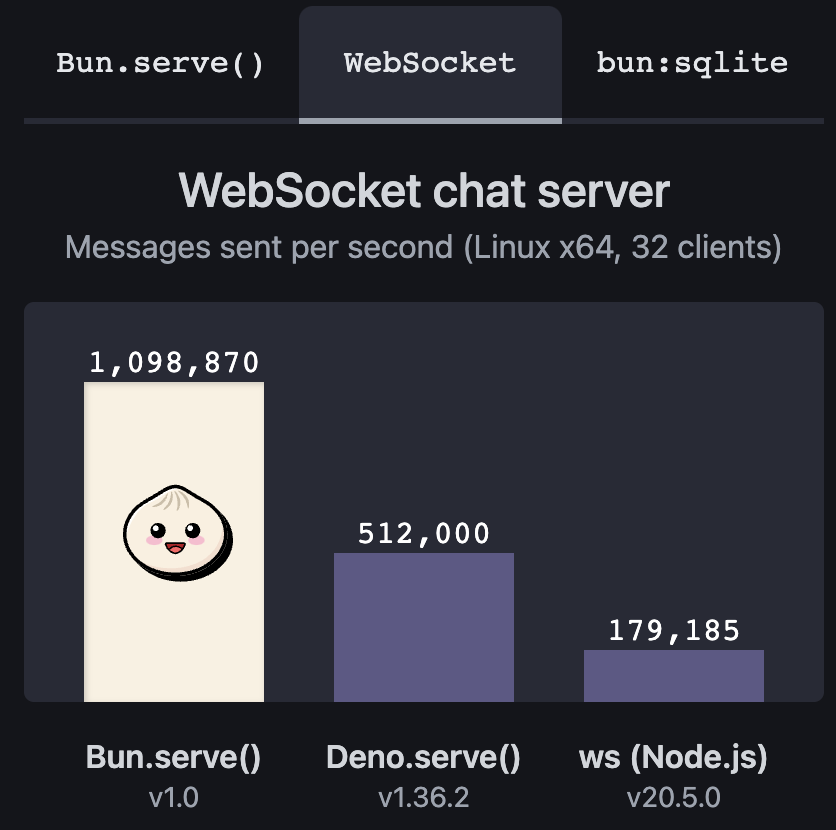
Websocket chat server
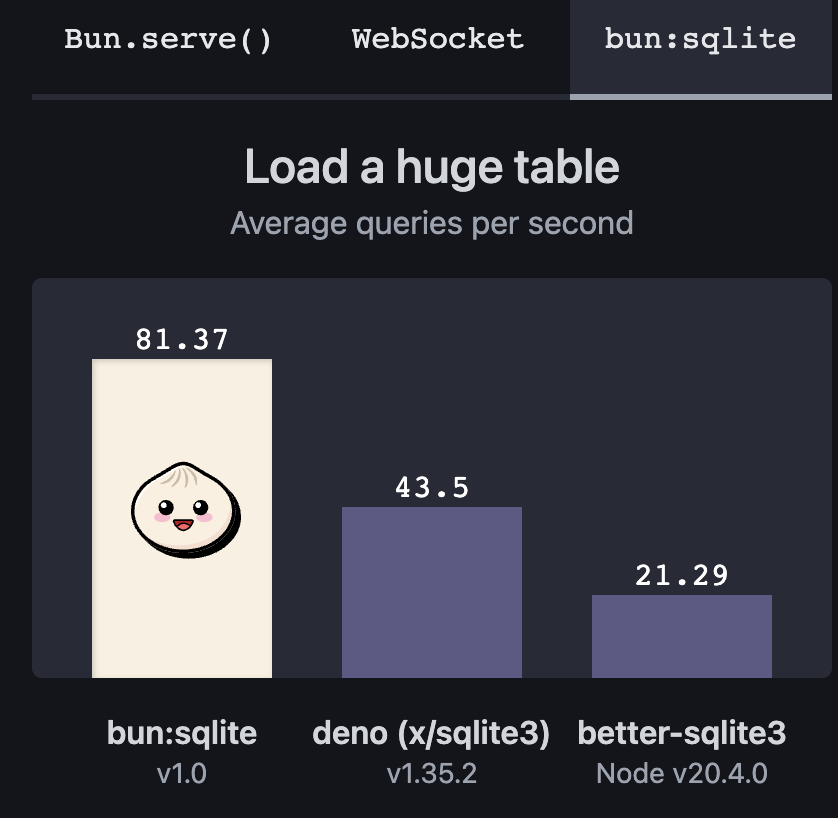
Query Data
Installation
curl -fsSL https://bun.sh/install | bash # for macOS, Linux, and WSL
QuickStart
Create a hello-bun folder and enter it:
mkdir hello-bun && cd hello-bun
Run the command $ bun init
At the end of the process the initial configuration files and an index.ts file will be generated.
Open the index.ts file and replace the content with:
const server = Bun.serve({
  port: 3000,
  fetch(req) {
    return new Response("Bun!");
  },
});

console.log(`Listening on http://localhost:${server.port} ...`);
Run in the terminal $ bun index.ts
A message will appear: Listening on http://localhost:3000 ...
This indicates that the server is ready and running on port 3000.
bun run is approximately 28x faster than npm run (6ms vs 170ms of overhead).
Conclusion
The goal of Bun is to run most server-side JavaScript applications and provide tools for performance, reducing complexity and increasing developer productivity.
At first glance the tool looks very promising, but I don't believe it will replace Node — it is too early to say anything like that. Node is already quite robust, has been on the market for 14 years with thousands of applications in production and a massive community. Bun is taking its first steps, just like Deno.
I don't have a strong opinion on Bun yet, but I believe it is worth following the project and seeing how it evolves. Over time I will bring news and tests with the tool.
But to know whether it is good or not, you just have to test it and see how it behaves. However I do not recommend using it in production yet — it is still too early for that and v1.0 was released recently.
But it is great to see new tools emerging and bringing new possibilities for JavaScript application development.