Detecting Circular Imports with Madge (and Locking Down Regressions in Lint)

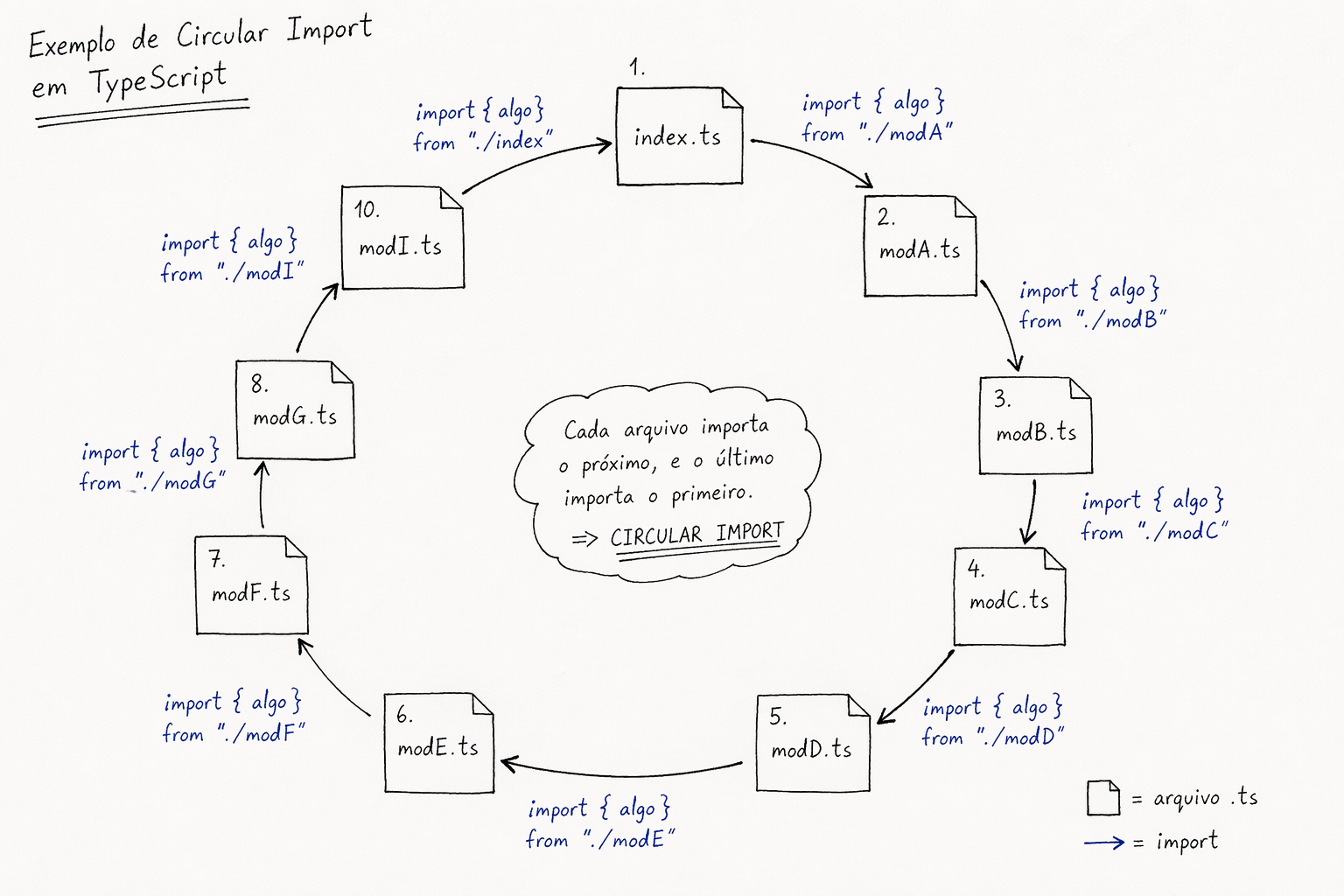
Anyone who has spent hours chasing an undefined in the middle of a bundle or a strange behavior only in production knows how an unresolved import chain can become a headache. One of the frequent culprits is the circular import: module A imports B, B imports C, and somewhere in the chain someone imports A again — closing a cycle.
It's wonderful — the build works, the project runs locally, but when you try to deploy, it breaks! \o/
I've seen this in small projects and in large ones; the only difference is the size of the problem you'll face. You can spot the headache with Madge and it's a lifesaver!
To lock up TypeScript, a circular import is a treat.
Day-to-day this shows up as a "partially initialized" export, a hook returning something it shouldn't, or a refactoring that seemed harmless and brought down half the team. The worst part is that the problem grows without criteria when there are lots of index.ts files re-exporting everything, a store that imports an HTTP client and the client somehow loops back to the store or the mock, React Query with query-keys in the same boat as the hook that consumes the query — a super common pattern.
The Problem with Circular Imports
In ECMAScript modules, each file is evaluated once, in the order the dependency graph exposes. When there is a cycle, part of the code may run before another piece has finished defining what you thought already existed. Hence the classic: "it worked in Vite but broke in CI", or the reverse — depending on the bundler, order, and phase of the moon.
This happens a lot when exports and imports are repeated — imagine utilities exporting their methods and other utilities re-exporting those again. Importing that tree will cause problems.
Cycles like this, to me, are also architecture problems: layers that should only go "forward" (like UI → domain → infra) end up pointing at each other in a circle. Unit tests become a soap opera, code splitting gets weird, and everyone is afraid to touch the index.ts in the components folder.
How this usually happens
Generally the project keeps growing and a lack of reviews of each layer ends up compromising the structure. Not to mention innocent exports that happen because it's faster...
Something I'm also noticing that I believe will scale significantly is the use of AI. I picked up some projects where it codes like crazy and the lack of proper code review (delegating to the AI) generates this type of problem.
In my opinion this problem will become increasingly common.
There's also the Barrel Import (I love this hehehe) with several files in an index.ts. Another very common cause is aliases in the project (@components, @utils, @hooks...). Inside a components folder I should never import another component via alias — only with the relative path.
Imagine the structure:
src/
└── components/
    ├── index.ts          // exports Button, Card, Modal
    ├── Button/
    │   └── index.tsx
    ├── Card/
    │   └── index.tsx
    └── Modal/
        └── index.tsx     // uses Button inside Modal
❌ Wrong — importing via alias inside the same components folder:
// src/components/Modal/index.tsx
import { Button } from '@components' // 🔁 loops back to the index.ts barrel

export function Modal() {
  return <Button>Close</Button>
}
What happens: components/index.ts exports Modal, and Modal imports @components — which is the very index.ts. Done, cycle closed.
✅ Right — use relative path between siblings:
// src/components/Modal/index.tsx
import { Button } from '../Button' // direct path, without going through the barrel

export function Modal() {
  return <Button>Close</Button>
}
The mental rule: aliases are for those consuming the module from outside. Inside the module itself, relative paths avoid looping back into the barrel and break the cycle before it's born.
constants.ts ↔ types.ts (or hook ↔ types)
It seems harmless: constants need a type, the type needs a literal that's in the constants. Two files pulling each other all the time.
// constants.ts
import type { TrainingMode } from './types'
export const MODES: TrainingMode[] = ['a', 'b']

// types.ts
import { MODES } from './constants'
export type TrainingMode = (typeof MODES)[number] // ❌ cycle
What I do: either merge into the same file (if it's small), or extract the base literal into a third "contract-only" file: training-mode.ts exports the string union, constants and types import from it, without importing each other.
Query keys and API hook (TanStack Query and friends)
Many people have query-keys.ts importing the hook (to build a key factory with the hook's function) and the hook imports the keys. It works until the day it turns into spaghetti and everything explodes.
// query-keys.ts
import { fetchSpaces } from './use-get-all-spaces-query' // ❌

// use-get-all-spaces-query.ts
import { spaceKeys } from './query-keys'
What I do: pure keys (strings, tuples, as const) in a file that does not import hooks. The hook imports the keys; never the other way around. Need a return type in the key? Use import type from a type that lives in a file with no hook dependency, or infer it only in the hook.
Store ↔ API ↔ interceptors
Store imports client; client or interceptor imports store (auth token, feature flag, MSW mock). In two or three refactorings it becomes one big loop — and Madge shows a huge list that looks like an impossible recipe.
What I do: whoever can, goes down to the lower layer without knowing the store (e.g.: pass getToken as a function when creating the client). MSW and fixtures should not import half the "production" app; separating fake data from UI imports has saved many problems in the past.
How to avoid it (and best practices I apply)
There's no magic — it's about dependency direction and fewer super-files:
- Mental rule: if the file is "infra" or a "domain module", it doesn't import screens or a giant component barrel. If it does, be suspicious.
import typewhen it's only a type: helps the compiler and helps rules like Biome's (ignoreTypes) to separate a runtime cycle from a type-only cycle. But note:import { type X }mixed with values doesn't disappear the same way as a "pure"import type; read your bundler/Biome docs.- Small barrels: one
index.tsper feature or folder, not a God-mother-exports-everything that half the world imports via@/thing. - Extract the "contract": shared type, base literal constant,
query keyfactory without network logic — thin files in the middle of the graph break cycles without hacks. - Don't import "back" just out of laziness about the path: alias
@/is great for consumers external to the module; internally, relative paths are usually more honest about who depends on whom. import/no-cycle(ESLint) ornoImportCycles(Biome) in CI: I treat it like a seatbelt. If the project is already cyclical from birth, starting withwarnand closing the worst ones is a valid strategy — set it toerrorwhen you can.
Madge: see the monster before debating it in the PR
Madge maps the import graph and helps you show the problem (list, JSON, graph).

- Cycles with
--circular. - Useful things for auditing:
summary,depends,orphans,leaves,--jsonfor scripting. - Figure with
--image— but in Madge 8 this usually requires Graphviz on the machine (brew install graphvizon macOS, for example).
The other day I generated a graph that was enormous — there were so many circular imports I honestly don't know how the project worked. It was over 50 files doing this. It was laborious to fix because it touched the architecture and several sensitive points, but Madge helped shed light on that chaos.
Actually the project was already showing alarm signs — like a good ethanol-powered car in cold weather, it was already struggling to build, TypeScript took minutes, and lint was even worse... But as with everything in life, we didn't fix it until it actually broke hahahaha.
Now let's get to some practical executions, so you leave this article with the command in hand.
TypeScript: don't fall into the "0 files processed" trap
If you run madge --circular ./src without specifying .ts / .tsx and without tsconfig, you might get Processed 0 files and a lying "all clear". What I use:
npx madge --circular --extensions ts,tsx --ts-config tsconfig.json ./src
For SVG of only the modules involved in the cycle (much more readable than the full graph):
npx madge --circular --extensions ts,tsx --ts-config tsconfig.json ./src --image graph-circular.svg
The image at the top here is illustrative; in your article on your site you can replace it with a real export from your repo and you're good.
Closing the tap in lint
Madge I use for discovery and discussion; lint I use so nobody reopens the hole by accident.
ESLint
With eslint-plugin-import, the rule import/no-cycle:
// eslint.config.js (flat config) — illustrative excerpt
import importPlugin from 'eslint-plugin-import';

export default [
  {
    plugins: { import: importPlugin },
    rules: {
      'import/no-cycle': ['error', { maxDepth: 10 }],
    },
  },
];
maxDepth you calibrate based on the repo size and the time lint takes — there's no single universal value.
Biome
Native rule noImportCycles in the suspicious group:
{
  "linter": {
    "rules": {
      "suspicious": {
        "noImportCycles": {
          "level": "error",
          "options": {
            "ignoreTypes": true
          }
        }
      }
    }
  }
}
Conclusion
Circular imports are not a "vitamin" for TypeScript users — it's graph structure that you let make a full loop. The examples above are the ones I see most in the real world: overly comfortable barrel, constants/types pair, keys vs hook, store vs client.
A graphical tool (Madge + Graphviz) helps show the team where the knot is; a lint rule helps not regress when someone decides to "just import from there because it's closer".
Architecture isn't just a pretty folder structure — it's a dependency arrow with direction. One arrow at a time, and your "random undefined" mostly disappears.
And be careful with projects scaling wildly without review, especially nowadays when many people think coding is easy... Just throw it at the AI and it'll figure it out. Go for it.
In production when there's a problem, you'll be the one held accountable — not the AI — so don't neglect architecture, best practices, review and proper testing, understanding the project you're working on, and of course, using the right tools to not let the monster be born.