Release Engineering

Hello, in this article I'll talk a bit about Release Engineering, describing some points about the journey of compilation, environments, best practices, and code delivery.
This article is inspired by the Google SRE book; much of the content references that material, especially regarding best practices.
I'll also show how to use github actions to set up a deployment pipeline for a web application (I don't actually perform the deploy, I just demonstrate a configuration to serve as an example).
What is Release Engineering?
A discipline for elaborating and delivering software versions. Source code management, compilers, build configuration languages, automated build tools, package managers and installers. Its skill set encompasses: development, configuration management, test integration, system administration, and customer support.
What are the challenges of Release Engineering?
- Choosing tools
- Source code management
- Slow builds
- Pipeline standardization
- Security
- Scale
- Monitoring
- Multi-cloud
What are the main challenges for infrastructure?
- Choosing tools
- Price
- Support
- Integration
- Cost optimization
- Resource utilization
What is a Release Engineer?
Defines best practices to ensure consistency and repeatability of software processes.

Best practices for working with Release Engineering according to the Google SRE book
Self-service Model
- Teams must be self-sufficient to work at scale
- Teams decide when and how often to generate a release
- Release processes can be automated to the point of minimum effort
- Releases are truly automatic, not just automated
High Velocity
- Frequent builds have fewer changes between versions
- Easier to troubleshoot
- Builds frequently rebuilt to release features quickly.
- Facilitates testing and troubleshooting.
- Some teams frequently create builds and select which ones to deploy
- Other teams have adopted a "push on green" approach.
- Deploy all builds that pass all tests
Hermetic Builds
- Builds should be consistent and repeatable.
- The same version should be shipped without changes after compilation.
- No externally made changes should exist.
- Cherry picking: how to fix a bug in running software.
- Apply only the fix needed to resolve the bug
- Don't ship solutions that aren't specific to the bug being addressed
Policy and Procedure Enforcement
Multiple layers of security and access control determine who can perform specific operations (typically controlled by code reviews):
- Approval of source code changes
- Specifying actions to be taken during the release process
- Creating a new release
- Approval of the initial integration proposal and version/package choices for production
- How to deploy a new version
- How to make changes to a project's build configuration
CI/CD Guidelines for Release Engineering
Continuous Integration (CI):
Maintain all developed code in a location where you can build and test the project, as well as identify changes made to it. An example is maintaining code in a repository (github, gitlab, codecommit, others) with tests, automated builds, and other features.
Continuous Delivery (CD):
An extension of Continuous Integration that can have pipeline steps to certify that a release can go to production.
Benefits
Development speed
Continuous feedback allows developers to commit smaller changes more frequently, instead of waiting for a release. Development speed
Stability and reliability
Automated and continuous testing ensures that codebases remain stable and ready to release at any time. Stability and reliability
Business growth
Free from manual tasks, organizations can focus resources on innovation, customer satisfaction, and paying down technical debt. Business growth
Development Pipeline Example
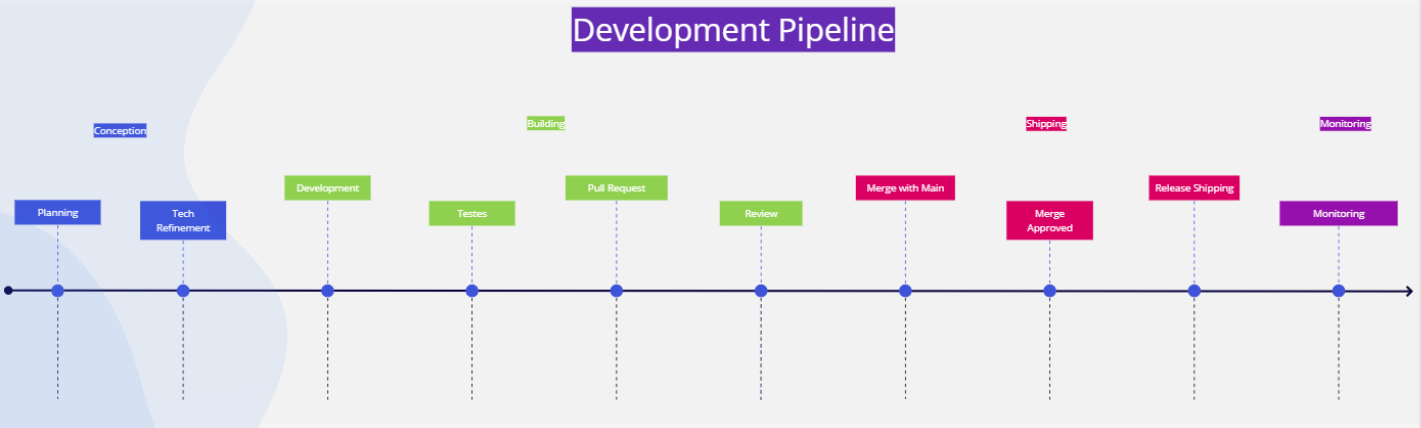
Best Practices
Once your code is ready to be shipped to the production environment, the product team should follow some steps:
- Update internal documentation;
- Update end-user documentation;
- Create a changelog for all products and/or services;
- Approval from the quality assurance team. Without approval, the team should not ship to production;
- Distribute Release Notes to all interested parties in the company (marketing, support, product, etc.);
- Support team must be properly trained to handle any issues users may encounter;
- Complete checklist by the Engineering team;
- After all steps, a Tag should be created;
- Use semantic versioning or a 'Human Readable Name';
- Create monitoring to track the new version.
CI/CD Checklist
Transparency
If a build fails, developers need to quickly evaluate what went wrong and why.
Speed
CI/CD contributes to the overall performance of DevOps, especially speed.
Resilience
When used with other approaches, such as test coverage, observability tools, and feature flags, CI/CD makes software more resistant to errors.
Security
A future-proof CI/CD pipeline has code checks and permissions and provides a virtual paper trail for audit failures, security violations, and non-compliance events.
Deployment Strategies
Recreate
Recreates the application, may have downtime.
Rolling
New Pods are created and slowly replace the previous ones.
Blue / Green
QA tests; after approval the application is shipped to users.
Canary
The version rollout is controlled by percentage.
A/B Testing
Multiple versions running in parallel. Metrics capture.
Shadow
Version A and B in parallel; version A traffic is mirrored to B without affecting production traffic.
Rollback
When a released version needs to be reverted to the previous one. This approach is generally used when issues arise where the new version cannot remain live and it's necessary to return to the previous version.

What is Github
Github is a web service that offers various extra features built on top of git.
It's like a social network for programmers. There you can host your projects for free.
Examples of other versioning tools
- Gitlab
- Apache Subversion
- AWS Codecommit
- Mercurial
- CVS
- Bitbucket
What is Version Control:
Version control is a system that helps you manage your code. It keeps a record of changes to a file or even a set of files throughout your project. So if an error occurs, we can go back in time (return to previous versions) and compare the code, helping identify the error.
Hands on
name: CI/CD

on:
  push:
    branches: [ "main" ]

jobs:
  Validation:
    runs-on: ubuntu-latest
    name: Validation
    strategy:
      fail-fast: false
      matrix:
        apps:
          - froot-loops
    defaults:
      run:
        shell: bash
        working-directory: ${{ matrix.apps }}

    steps:
      - name: Checkout
        uses: actions/checkout@v2

      - name: Use Node.js
        uses: actions/setup-node@v1
        with:
          node-version: "14"

      - name: Install packages
        run: yarn
        working-directory: ${{ env.working-directory }}

      - name: Run tests
        run: echo "Running tests"

  Build:
    runs-on: ubuntu-latest
    needs: [Validation]
    steps:
      - name: Checkout
        uses: actions/checkout@v2

      - name: Build
        run: echo "Generating build"

  UAT:
    runs-on: ubuntu-latest
    needs: [Build]
    steps:
      - name: Checkout
        uses: actions/checkout@v2

      - name: Deploy
        run: echo "Deploying to UAT environment"

  e2e:
    runs-on: ubuntu-latest
    needs: [Build]
    steps:
      - name: Checkout
        uses: actions/checkout@v2

      - name: Tests
        run: echo "Running end to end tests"

  Production:
    runs-on: ubuntu-latest
    needs: [e2e]
    steps:
      - name: Checkout
        uses: actions/checkout@v2

      - name: Deploy
        run: echo "Deploying to Production environment"

Repository with the example above
Conclusion
Software releases can be automatic, not just automated;
It requires alignment across all squads in the company;
Solving Release Engineering problems "at scale" makes solutions for smaller environments easier;
Many companies face the same dilemma:
- How do you version your packages?
- How often should you release?
- Do you use a Push on Green model?
References
- https://www.usenix.org/sites/default/files/conference/protected-files/lisa15_slides_mcnutt.pdf
- https://sre.google/sre-book/release-engineering/
- https://engineering.fb.com/2017/08/31/web/rapid-release-at-massive-scale/
- https://github.blog/2021-11-18-7-advanced-workflow-automation-features-with-github-actions/
- https://storage.googleapis.com/pub-tools-public-publication-data/pdf/100fc6a6879ce86d30ca4f4a1b8e49f06a39f3ab.pdf
- https://www.xenonstack.com/blog/release-engineering-infrastructure-automation
- https://resources.github.com/ci-cd/
- https://www.nexastack.com/blog/release-engineering-best-practices
- https://dev.to/github/setup-continuous-delivery-with-github-actions-4pea
- https://docs.github.com/en/actions/quickstart
- https://www.smashingmagazine.com/2020/10/handling-continuous-integration-delivery-github-actions/
- https://cloud.netapp.com/blog/cvo-blg-5-github-actions-cicd-best-practices
- https://github.com/readme/guides/walking-the-walk-bringing-end-to-end-automation-and-testing-to-internal-teams
- https://cloud.google.com/blog/products/devops-sre/another-way-to-gauge-your-devops-performance-according-to-dora
- https://www.youtube.com/watch?v=G5YQJdOhaZM&ab_channel=GitHub