The Wonders of Composition with React HOCs

Hello, young grasshoppers! I'm bringing a bit more content about React. I believe it will be very helpful, especially for beginners. Today, I'll explain a little about HOC (Higher-Order Component).
What are Higher-Order Components?
In summary, an HOC is a function that receives a component and returns another component. 😕 They are like HOFs (Higher-Order Functions), which is a function that receives another function and returns a function (now it's getting worse) hehehe.
I know, it may seem strange, but it will make sense.
HOCs are very common in libraries like Redux (connect), Relay (createFragmentContainer), Mobx (observer), and others. It's also possible to create your own HOC (of course 🍭).
Note: HOCs are not part of React itself — they are a pattern for development using composition and inheritance.
The main purpose of HOCs is the sharing of common functionality between components without code duplication, basically.
With this, it's possible to create a component that has an internal state to control its "children".
Imagine a situation where we have a page that receives news and has several components. Communication between them is done via props. Each component has its own rendering and behavior, and they depend on the parent component to display content. But while the parent's data hasn't finished loading, the children cannot be shown. You could add a loader to each component until the data finishes loading. That will work, but it can become a maintenance problem, not to mention code duplication. It won't look good, so it's definitely not what we want.
What can I do with HOCs?
- Code reuse, logic, and abstraction;
- Render control;
- State abstraction and manipulation;
- Props manipulation.
There are two types of HOCs:
Proxy
These are HOCs that pass properties to their children. This is also the type I used to create the example in this article.
function ppHOC(WrappedComponent) {
  return class PP extends React.Component {
    render() {
      const newProps = {
        user: currentLoggedInUser
      }
      return <WrappedComponent {...this.props} {...newProps}/>
    }
  }
}
When should I use a proxy?
- Props manipulation
- Accessing the instance via ref
- State abstraction
- Wrapping a component with other elements
Inheritance Inversion
This type of HOC extends its class from the component it receives, thus having access to the instance, state, lifecycle, hooks, and render props.
function iiHOC(WrappedComponent) {
  return class Enhancer extends WrappedComponent {
    render() {
      return super.render()
    }
  }
}
When should I use Inheritance Inversion?
- Render Hijacking
- State manipulation
Now let's create our HOC =D
I used create-react-app to make project initialization easier.
I won't go into detail about how create-react-app works and when to use it — that's a topic for another article. But the installation and usage are very straightforward, as we'll see below.
If you have npm 5.2+ you can install it like this:
npx create-react-app hoc-react-example
If not, you can install it as follows:
npm i -g create-react-app && create-react-app hoc-react-example
After installation, run the project:
With NPM:
npm start
or with YARN:
yarn start
Once done, a browser tab will open. http://localhost:3000/
Well, since I'm a beer enthusiast, I'll create an HOC that "brews beer". For this, I kept the project as simple as possible with just a few files, and the structure looks like this:
hoc-react-example
├── README.md
├── node_modules
├── package.json
├── .gitignore
├── public
│ ├── favicon.ico
│ ├── index.html
│ └── manifest.json
└── src
├── components
│ └── Cup.js
├── containers
│ ├── Ale.js
│ ├── Lager.js
│ └── Wise.js
├── App.js
├── index.css
├── index.js
├── logo.svg
└── serviceWorker.js
Where components are the project's components and containers are the pages.
The home page containing all the HOCs looks like this:
import React, { Component } from 'react'
import Lager from './containers/Lager'
import Wise from './containers/Wise'
import Ale from './containers/Ale'

class App extends Component {
  state = {
    lager: false,
    wise: false,
    ale: false
  }

  componentDidMount() {
    setTimeout(() => this.setState({ wise: true }), 2000);
    setTimeout(() => this.setState({ lager: true }), 4000);
    setTimeout(() => this.setState({ ale: true }), 1000);
  }

  render() {
    const {
      lager,
      ale,
      wise
    } = this.state;

    return (
      <div className="App" style={{ display: "flex", flex: "1", justifyContent: "space-between" }}>
        <Lager completed={lager} type="lager" />
        <Ale completed={ale} />
        <Wise completed={wise} />
      </div>
    );
  }
}

export default App;
For our beer factory to work, I created 3 types of beers — Ale, Wise, and Lager. These are the containers (lines 2, 3, and 4 of the example above).
Ignore the inline CSS — I did it that way because I'm not using a CSS preprocessor and I didn't want to create a stylesheet for this case, since it's a quick example and the final goal is to demonstrate HOC functionality.
To simulate the brewing process, I added a timeout that, when finished, changes the state of each beer to true (lines 14, 15, 16). This could be a service call — the end result is the same.
And the state of each beer is passed via props (lines 28, 29, and 30).
The contents of each beer look like this:
./src/containers/Ale.js
import React from 'react'
import withDrink from '../hoc'

const recipe = {
  malte: '1kg',
  water: '16l',
  hops: '10g',
  maturation: '1000'
}

const Ale = (props) => {
  return (
    <div>
      <h1>Ale</h1>
      {props.children}
    </div>
  )
}

export default withDrink(Ale, recipe)
./src/containers/Wise.js
import React from 'react'
import withDrink from '../hoc'

const recipe = {
  malte: '1kg',
  water: '14l',
  hops: '12g',
  maturation: '1500'
}

const Wise = (props) => {
  return (
    <div>
      <h1>Wise</h1>
      {props.children}
    </div>
  )
}

export default withDrink(Wise, recipe)
./src/containers/Lager.js
import React from 'react'
import withDrink from '../hoc'

const recipe = {
  malte: '1,2kg',
  water: '12l',
  hops: '12g',
  maturation: '1000'
}

const Larger = (props) => {
  return (
    <div>
      <h1>Lager</h1>
      {props.children}
    </div>
  )
}

export default withDrink(Larger, recipe)
Great, now we have our App with three beers ready to be produced.
But what about the HOC?! 😐
Notice that in each container's export there is a function called withDrink sending two properties — the container itself and the recipe for each beer. This is exactly where the magic of abstraction begins, as we'll see below with the creation of the HOC that will be in charge of brewing the beer.
./src/hoc.js
import React from 'react'
import Cup from './components/Cup'
import Loading from './loading.gif'

const withDrink = (WrapperComponent, recipe) => {

  const ComponentEnhanced = (props) => {

    const isCompleted = props.completed

    return (
      <>
        {
          !isCompleted ? (
            <div style={{ display: "flex", flex: "1" }}>
              <h1>Recipe:</h1>
              <div>
                <p><label>Malte:</label>{recipe.malte}</p>
                <p><label>Water:</label>{recipe.water}</p>
                <p><label>Hops:</label>{recipe.hops}</p>
                <p><label>Maturation:</label>{recipe.maturaion}</p>
              </div>
              <img src={Loading} style={{ display: 'block', width: "328px", height: "278px", margin: '0 auto' }} />
            </div>
          ) : (
              <WrapperComponent {...props}>
                {<Cup isCompleted={isCompleted} />}
              </WrapperComponent>
            )
        }
      </>
    )
  }

  ComponentEnhanced.defaultProps = {
    completed: false
  }

  return ComponentEnhanced
}


export default withDrink
Done, now we have our HOC created =D
How does it work?
Line 5 — creation of a function that receives a component and a recipe (here it's just an object, but it can be any parameter).
Line 6 — creation of a function that takes props as a parameter.
Line 9 — Remember that in App.js I passed completed as a prop? Inside the withDrink method I have all the props that are sent to each container in ./src/App.js.
Line 11 — Return of a new element.
Line 12 — Addition of a Fragment in React (can be done in two ways: importing Fragment from React or simply declaring it as on lines 11 and 31).
Line 14 — I made a check to see if the beer is ready or not. While the value is false I display the recipe sent by each container and return a loading indicator, to show that the beer is in the brewing process =D.
As soon as the timeout in App.js finishes for each container and the value of completed changes to true, the HOC returns a new component with all the properties it received and a cup component — the ice-cold beer being served in a glass, to be enjoyed while snacking and watching the game! =D
And on line 39 I simply return the HOC.
The final result looks like this:
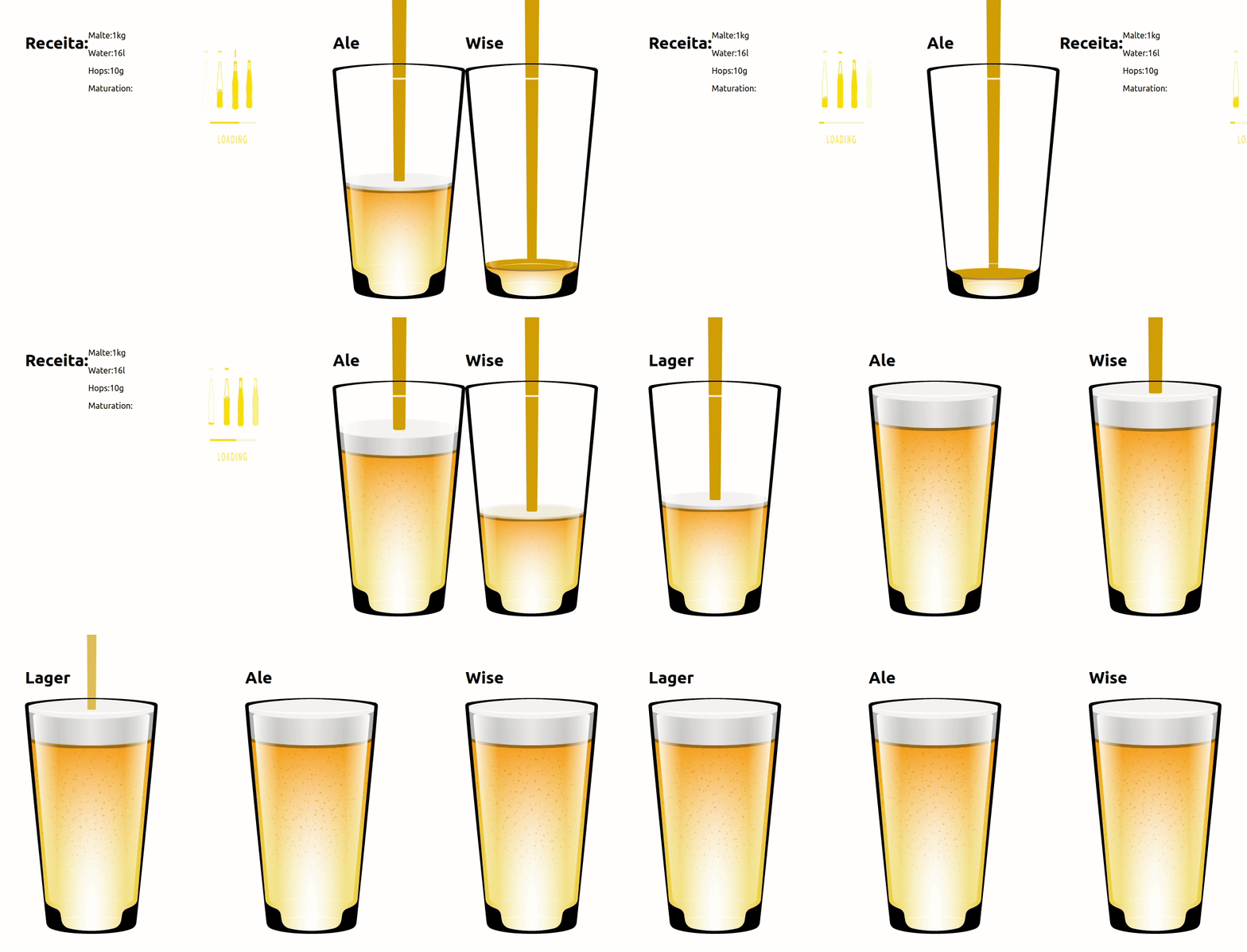
Beautiful, right!? And quite simple!
The full project is on my GitHub: HOC React Example
This example is a simplified version of HOC usage. The intent is simply to demonstrate how to connect it to other components and achieve full code reuse. The way it was built, I'm sure the recipe for each beer will always be shown (as long as recipe is passed, of course) and the control over whether it was completed will always be consistent. Otherwise I'd have to copy the code and send it to each container (Ale.js, Wise.js, and Lager.js), which would make maintenance harder and could generate different behavior on each page.
Using an HOC makes all the control much simpler.
When should you use one?
Well, as already mentioned, HOCs are very useful for creating component composition with great code reuse.
HOCs are very common for route protection, form validation, loading control, state and props management, and much more. There are many cases where we can use an HOC, but only do it if it's necessary. It's very common to want to use something in a project for learning purposes, but we should always consider whether the system truly needs that implementation.
Important tips
Don't mutate the original component — use composition.
HOCs should not use mutation, as it can cause various problems. Instead, use composition.
Don't use HOCs inside a render method.
"React uses the component's identity to determine whether it should update the existing subtree or discard it and mount a new one. If the component returned from render is identical (===) to the component from the previous render, React recursively updates the subtree by diffing it with the new one. If they're not equal, the previous subtree is unmounted completely." React Docs
Another way to create a HOC — Enhanced-style HOCs
This is another way to create a Higher Order Component. Its main characteristic is that it returns a function instead of a component. The wrapped component is received in the function that will return it — there's no need to pass the component as a parameter. This can make the code cleaner.
Libraries like Relay and Redux use this approach.
The advantage of this is when we have several HOCs calling each other. We can use React's composition to share logic across all components, which can make the code efficient and reusable.
Another way to improve HOC usage is with render props.
I also recommend reading about decorator patterns.
Did you like the article? Then share it and leave some claps (no less than 50 hahaha 😚). Leave your comment below — constructive criticism is always welcome and will help me bring even better content. Want me to write about a specific topic? Just send me a message and I'll cover it :D I'm always willing to help and it's a pleasure to be able to share some knowledge.
I hope this was helpful — thanks and cheers!
References: The Cup component is the beer-being-served animation — I took the CSS from this example: https://codepen.io/mikegolus/pen/jJzRwJ
All the cup content and its animation was created by Mike Golus
https://reactjs.org/docs/higher-order-components.html
https://medium.com/reactbrasil/meu-primeiro-higher-order-component-a376efc654a8
https://blog.rocketseat.com.br/higher-order-components-hocs-no-react-e-react-native/
https://www.robinwieruch.de/gentle-introduction-higher-order-components/
https://blog.wgbn.com.br/react-higher-order-components-hocs-para-iniciantes-ae888120b50
https://medium.com/@franleplant/react-higher-order-components-in-depth-cf9032ee6c3e